
Automation Conflict Detection
Automated Conflict Scanning for Salesforce Triggers and Flows
Find Automation Conflicts Before They Cause Production Incidents.
Every Salesforce org accumulates automation over time — triggers written by one developer, flows built by another, legacy processes left over from migrations. Each one works in isolation. Together, some of them conflict in ways that are invisible until something breaks in production.
The Automation Conflict Detection System automatically scans every active trigger and flow in your Salesforce org, identifies the combinations that create risk, and delivers a prioritised conflict report — before a data overwrite, an infinite loop, or an unexpected behaviour reaches your users.
See It In Action
Watch how the Automation Conflict Detection System scans every active trigger and flow in a Salesforce org and delivers a prioritised conflict report — automatically, with no manual review required.
Automation Conflict Detection — Demo
Why Automation Conflicts Go Undetected
Salesforce orgs grow organically. Developers add triggers. Admins build flows. Teams migrate from Process Builder. Over time, multiple automations end up operating on the same objects and fields — and without a central view, nobody knows what is interacting with what:
How Automation Conflict Detection Works
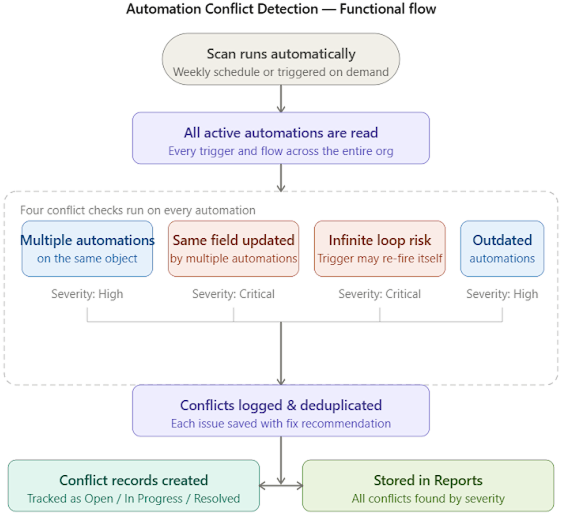
The system scans all active automations in the org on a weekly schedule, checks them against four conflict detection rules, and surfaces every finding as a tracked record in Salesforce — with severity, a plain English description, and a remediation recommendation.
The process runs in three stages, entirely without manual intervention:
Stage 1 — Automation Inventory Collected
The system retrieves the full list of active Apex Triggers and Flows across the org — including the objects they fire on, the events they respond to, and the fields they update. This happens automatically at the start of every scheduled scan.
Stage 2 — Four Conflict Checks Run
A detection engine evaluates the collected automation data against four independent conflict rules, covering field overwrite risk, infinite loop risk, execution order risk, and deprecation risk. Each check runs across the entire org in a single pass.
Stage 3 — Findings Saved as Conflict Records
Every detected conflict is saved to a custom Salesforce object with its severity level, the automations involved, the affected object and field, and a recommended remediation step — ready for the team to review, assign, and resolve.
Functional Flow Diagram
Technical Solution Overview
The Automation Conflict Detection System is a fully native solution built on Salesforce Apex and the Tooling API. The scheduled Apex orchestration layer runs end-to-end without manual intervention — retrieving every active trigger and flow across the org, evaluating them against four independent conflict detection rules, and persisting every finding as a tracked, assignable record in Salesforce.
Each capability is delivered through Salesforce technologies as follows:
Key Features
Four Conflict Detection Rules — Covering the Most Critical Risk Types
The detection engine checks every active automation against four independent rules, each targeting a distinct category of conflict risk. Findings are categorised by severity so teams can prioritise what to fix first.
Fully Automated Weekly Scan — No Manual Steps Required
Once deployed, the system runs on a weekly schedule without any manual trigger or intervention. Every scan is idempotent — it is safe to run multiple times, and each run replaces the previous results with the latest findings from the current state of the org.
Conflict Records in Salesforce — Tracked, Assignable, and Reportable
Every detected conflict is saved as a record in a dedicated Salesforce custom object. Each record captures the full context of the conflict — the automations involved, the affected object and field, the severity level, and a recommended remediation step — making findings trackable and assignable like any other work item.
Fully Native Salesforce — No External Tools Required
The entire solution runs within the Salesforce platform using standard development infrastructure. There is no external scanning tool, no third-party integration, and no additional licence required. Conflict records, status tracking, and history all live in Salesforce alongside the automations being monitored.
Business Impact
For Salesforce Administrators
For Development & Release Teams
For Business & Operations Leaders