
Semantic Duplicate Detection & Merge
AI-Powered Duplicate Detection for Salesforce Accounts
Automatically Identify Duplicate Accounts — Even When They Look Different.
Duplicate Account records are one of the most persistent data quality challenges in Salesforce. They fragment customer information, distort reporting, and cause sales and support teams to unknowingly duplicate effort — all without anyone realising it is happening.
Duplicate Account Detection solves this automatically. Using AI-powered semantic matching, the system continuously scans your Salesforce accounts, identifies probable duplicates, and surfaces them for manager review — without any manual searching, scripting, or rule maintenance.
See It In Action
Watch how Semantic Duplicate Detection & Merge identifies probable duplicate accounts across name variations and formats, surfaces them for manager review, and merges them with a single click.
Semantic Duplicate Detection & Merge — Demo
Why Traditional Duplicate Detection Falls Short
Standard Salesforce duplicate rules match accounts only when field values are identical or near-identical. In practice, the same account is often entered in multiple ways — and traditional rules miss every one of these cases:
How Duplicate Account Detection Works
Instead of matching on exact field values, the solution understands the meaning behind account data. It converts each account into an AI-generated representation of its semantic content — capturing what the account actually describes, not just the words used to describe it.
This approach enables the system to detect duplicates that have different names, varied address formats, or differently worded descriptions — as long as they refer to the same real-world account.
The process runs fully automatically, every 2 hours, across four steps:
Step 1 — Combine Account Data
Account Name, Billing Address, Description, and Email are brought together into a single unified representation of the account.
Step 2 — Generate AI Understanding
The combined account data is processed by an AI service that converts it into a mathematical representation capturing its semantic meaning — not just its literal words.
Step 3 — Search for Similar Accounts
The system compares this representation against all existing accounts to find the closest semantic matches, each paired with a similarity score between 0 and 1.
Step 4 — Flag for Review
When a sufficiently similar account is found, the pair is recorded in Salesforce as a Duplicate Account record, ready for a manager to review and act on.
Functional Flow Diagram
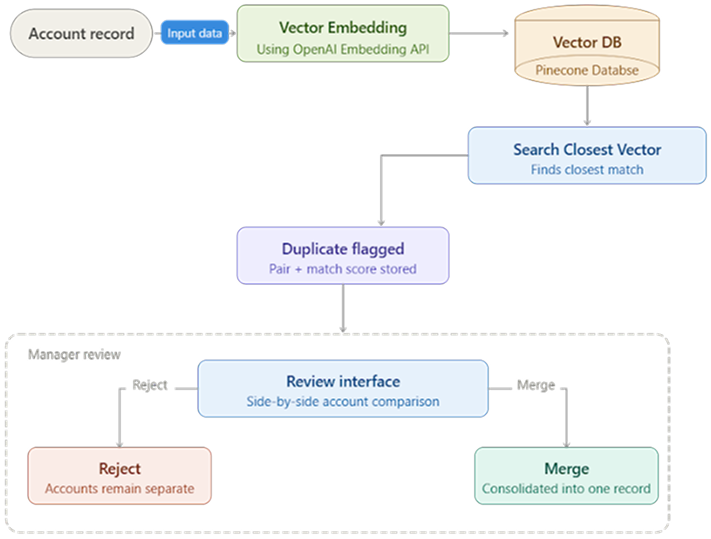
Functional flow: from account data combination through AI embedding generation, similarity search, duplicate flagging, and manager review.
Technical Solution Overview
The Semantic Duplicate Detection & Merge solution is an AI-powered solution built natively on Salesforce. The system autonomously runs end-to-end — continuously scanning account records, generating semantic representations, identifying probable duplicates, and surfacing them for manager review — rather than waiting for manual intervention or relying on rule-based matching.
Each capability is delivered through Salesforce technologies as follows:
Architecture principle: AI-generated semantic embeddings guarantee that duplicates are caught even when field values differ in wording, format, or completeness — coverage that rule-based matching cannot achieve. Deterministic Salesforce scheduling and custom objects handle orchestration and auditability, while the manager review layer ensures no data is altered without human approval.
Key Features
Semantic Matching — Catches What Rules Miss
The AI understands the meaning of account data rather than comparing characters. This means duplicates are identified even when names are abbreviated, addresses are formatted differently, or descriptions use different wording for the same business.
Fully Automated — Runs Every 2 Hours
The detection process runs automatically on a fixed schedule, 12 times per day, without any manual trigger or intervention. New accounts are evaluated as soon as they enter the system, and each account is processed only once to avoid redundant checks.
Manager Review Interface — Human Oversight Before Any Merge
No accounts are merged automatically. Every flagged pair is surfaced to a manager through a dedicated review interface built directly within Salesforce. Managers can examine both accounts side-by-side along with the similarity score, and choose to merge or reject each pair with a single action.
Similarity Scoring — Prioritise What Needs Attention
Every flagged pair is assigned a match score from 0 to 1, giving managers a clear signal of how likely two accounts are to be true duplicates. Higher scores indicate stronger matches and warrant immediate review.
| Score range | Interpretation |
|---|---|
| 0.85 – 1.00 | Very likely duplicate — review and merge recommended |
| 0.50 – 0.84 | Possible duplicate — manual review recommended |
| Below 0.50 | Unlikely duplicate — may indicate threshold tuning is needed |